Interactive Text
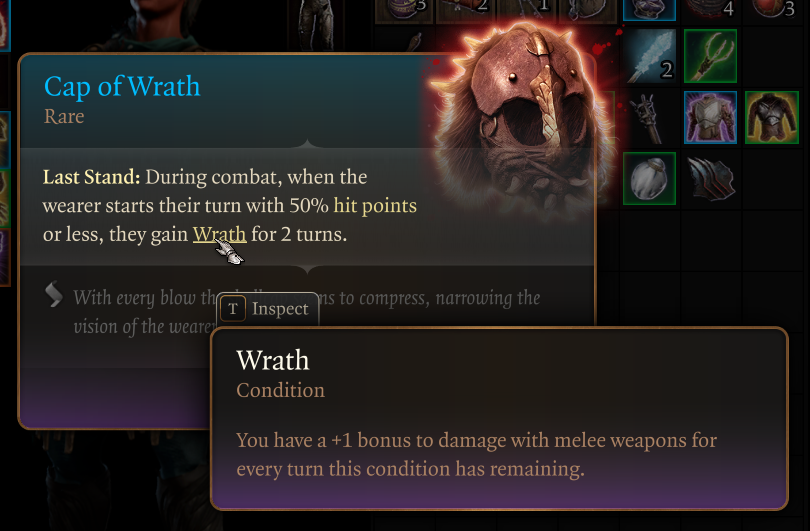
Complex game interfaces often embed interactive terms directly inside text.
An item description may mention a mechanic, such as corrosion, that players can hover to see defined. A dialogue line may include a location name that players can click to open on the map. A tutorial may call out a term that players can click to view in-context examples.
An example from Baldur’s Gate 3
Inline interactive text is common in RPGs and other UI-heavy games, but Unreal Engine does not provide a built-in system for authoring and handling it. Rich Text Blocks can display text with inline formatting, but they do not support interactivity.
I implemented this functionality in Unreal Engine through a custom FRichTextDecorator + URichTextBlockDecorator subclass. The decorator parses marked text spans, extracts their metadata, and generates invisible interactive Slate widgets aligned with the corresponding text range. These widgets respond to click and hover events and dispatch the associated metadata to user-defined logic.
The logic executed on click or hover is defined by subclassing a Blueprintable UObject base class in either C++ or Blueprint. This gives the system a Strategy-like structure: the decorator is responsible only for detecting and routing interactions, while the behavior itself lives in interchangeable handler objects.
A small subsystem acts as an intermediary between the decorator and the handlers. It interprets the metadata extracted from the text, resolves the appropriate interaction-handler class, instantiates that handler, and invokes it with any additional parameters carried by the markup.
The mapping between an interaction tag and its handler class is defined in a Data Asset. The whole authoring process can thus be handled in-editor, without any hardcoded keyword or behavior in C++.
UWorld Reference Issue
One practical issue was world access. Slate types such as FRichTextDecorator do not inherently have access to the world context (GetWorld()), yet many interaction handlers need one.
I initially fetched a world reference from the global engine pointer, with GEngine->GetWorldFromContextObject(GEngine->GameViewport, EGetWorldErrorMode::LogAndReturnNull). While functional, that approach implicitly depended on a valid game viewport and therefore on a specific runtime context. I replaced it by passing world context from the owning URichTextBlockDecorator into the decorator at creation time.
Practical Example
Here’s an example workflow for using this system to implement a ‘tooltip’ behavior for keywords in item descriptions:
- Subclass the base interaction-handler class in Blueprint or C++ and override its hover behavior to display a tooltip containing the appropriate definition text.
- In the item description, wrap the term in a custom markup tag such as
<keyword data-term="corrosion">corrosion</>. - In the Data Asset, add a mapping from the
keywordinteraction tag to the tooltip-handler class.
At runtime, when the player hovers over the word corrosion, the decorator forwards the parsed metadata to the subsystem. The subsystem resolves the handler associated with the keyword tag, passes it the parameter corrosion, and the handler displays the corresponding tooltip.